
Input Mapper
Visual node editor for mapping, routing, and automating multi-mouse input
Requires MouseMux running on Windows. Get it free.
Input Mapper v4
Visual node-based input mapping, automation, and signal processing.
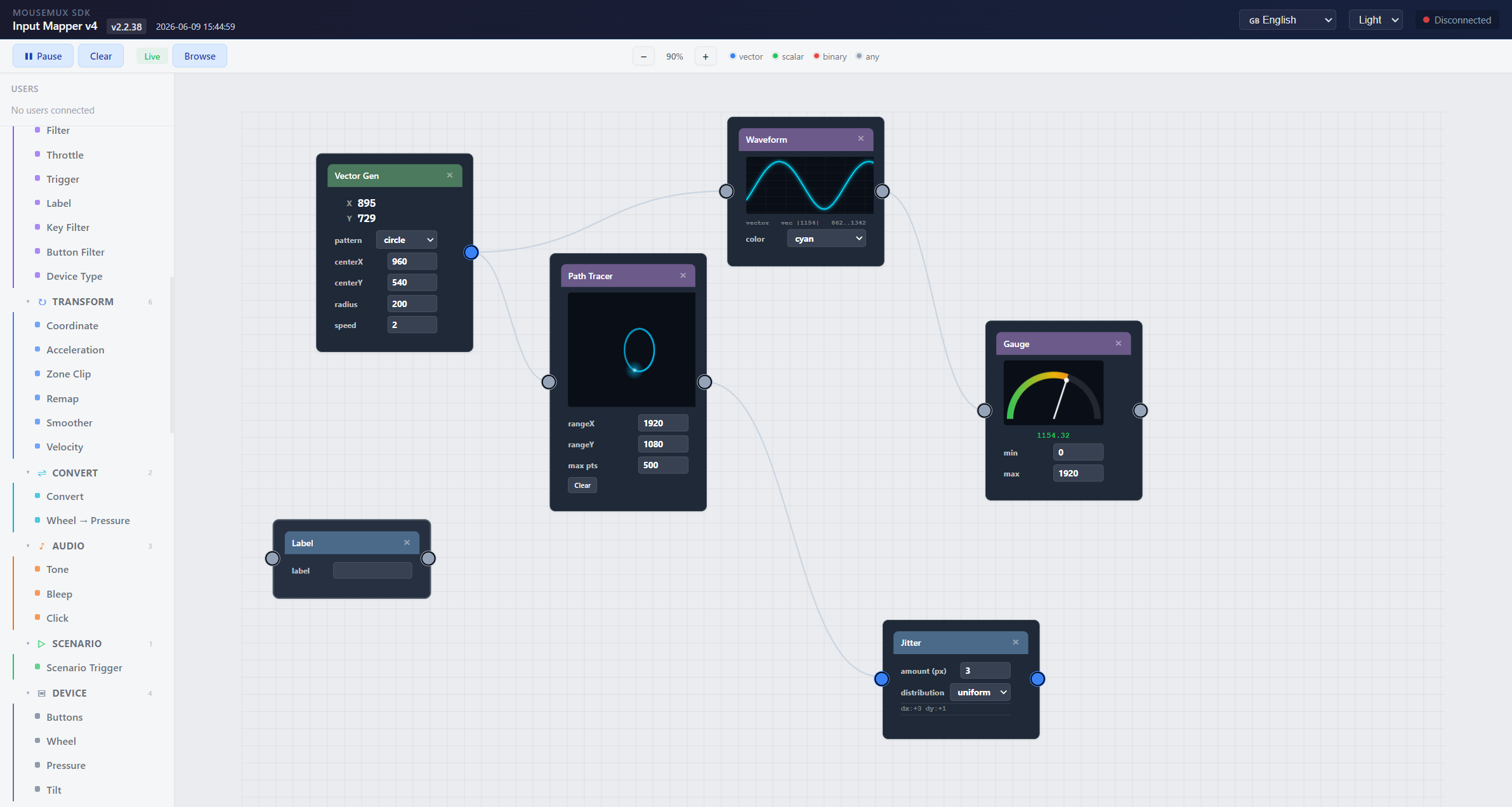
What This Is
A visual programming environment for input mapping, automation, and real-time signal processing. Users connect to MouseMux and automatically appear in the sidebar: their keyboard, mouse, pen, and touch inputs become signal sources you can wire through processing nodes, visualizers, and outputs. Built on Drawflow with the MouseMux Web SDK.
Three signal types flow through the graph: - Vector (blue): X,Y positions from mouse, pen, touch, or generators - Scalar (green): single numbers like pressure, wheel, volume, speed - Binary (red): on/off events like keys, buttons, triggers
MCP: control from Claude
Claude (Desktop or Code) can drive this editor over MCP: read the graph, build/edit it, and: when armed: operate MouseMux live (create virtual users, move/click/type, run/pause).
- Enable: click Enable MCP in the toolbar: the app hosts a localhost MCP server on
127.0.0.1:41760(off by default, remembered). - Connect: click Connect to Claude for copy-paste config (Claude Code by URL; Claude Desktop via the bundled shim run through the app: no Node install).
- In-app: the Arm MCP toolbar button gates live actuation (off by default, red when armed); the ? beside it opens MCP help.
- Full setup, tool reference, and tests: see
tools/mcp-input-mapper/README.md(repo root).
Node Categories
Over 130 node types across 18 subcategories:
Sources
Keyboard, Mouse, Pen, Touch, Microphone, Speech: per-user input sources that appear automatically when users connect.
Generators
Vector Generator (8 patterns: circle, spiral, lissajous, figure-8, etc.), Scalar Generator (7 waveforms: sine, square, sawtooth, etc.), Binary Generator (toggle, pulse, clock, etc.), Key Sequence, Key File: create signals without user input, run at 60fps.
Process > Math
Add, Multiply, Clamp, Math (abs/negate/pow/sqrt/round/etc.), Threshold: polymorphic, work on vector/scalar/binary.
Process > Route
Mirror, Split XY, Merge XY, Gate, Delay: signal routing and decomposition.
Process > Control
Merge, Replicator, Block, Filter, Throttle, Trigger, Label, Key Filter, Button Filter, Device Type: flow control and signal filtering.
Process > Transform
Coordinate, Acceleration, Zone Clip, Remap, Smoother, Velocity: coordinate transforms and signal shaping.
Process > Device
Buttons, Wheel, Pressure, Tilt: device-specific transforms (swap, invert, curve).
Process > Convert
Convert (11 modes), Wheel to Pressure: signal type conversion.
Process > Audio
Tone, Bleep, Click: sound synthesis driven by signals. Tone makes a theremin from mouse X.
Process > Scenario
Scenario Trigger, Move To, Click, Key Press, Wait, Check, Signal, Find Window: scripted action sequences.
Process > Recording
Recorder, Player, File Write, File Read: record and replay signal streams.
Process > AI
LLM: Claude/OpenAI/Custom API integration. Buffer signals as context, trigger fires request.
Process > Flow Control
Loop, Hotkey, Timer, Counter, Switch, Variable: automation control flow. Hotkey listens for global key combos, Timer fires periodically, Variable persists to localStorage.
Process > Screen
Pixel Color, Screen Region, OCR, Image Match: screen awareness. Sample pixels, capture regions, extract text, find images.
Process > Automation
Auto Clicker, Drag, Multi-Click, Type Text, Clipboard, Window Control: automated actions. Auto Clicker with configurable rate, Drag with interpolation, Type Text with per-character delay.
Process > Humanize
Random Delay, Jitter, Curve Move: make automated actions look human. Gaussian delay distribution, random position offset, bezier curve movement.
Process > Data
Compare, String, JSON Parse, HTTP Request: data processing. Compare with 7 operators, String with 8 operations, HTTP with GET/POST/PUT/DELETE.
Process > OS / System
Run Program, Kill Process, Find Process, Shell, File Op, Notification, Open URL, Power, Watch File, Environment: system integration. Launch programs, execute shell commands, file operations (read/write/copy/move/delete/list), system notifications, watch for file changes, read/write environment variables.
Output > Utility
Print, Monitor, Log: signal display and debugging.
Output > Inject
Virtual User, Real User: inject signals back into MouseMux users.
Output > Network
WS Server, WS Client, WS Relay, Barrier, WebRTC, WebSocket, MIDI: send signals over network or MIDI.
Output > Visual
XY Pad, LED, Oscilloscope, VU Meter, Heatmap, Path Tracer, Gauge, Spectrum, Radar, Waveform, Matrix, Mouse Monitor, Keyboard Monitor, Pen Monitor, Tablet Monitor, Touch Monitor: 16 real-time visualizers with mini canvases.
Templates
42 built-in templates organized by use case:
Signal Processing: Theremin, Click Sound, Invert Wheel, Mirror X, Key Remap, Motion Bleep, Virtual Cursor, Split + Monitor, Gated Signal, Smooth Mouse, Speed Detector
Visualization: XY Pad Monitor, Full Mouse Monitor, Movement Heatmap, Path Recorder, Radar Monitor, Matrix Signal, Waveform View
Networking: Barrier Bridge, WebRTC Share
Recording: Record & Play
Input Devices: Pen Pressure, Touch Visualizer
Automation: Auto Clicker, Type Text Macro, Click Loop, Smooth Drag, Multi-Click Macro, Signal Switch
Data & AI: API Poller, Voice to Text, LLM Chatbot, Variable Counter, Mic Volume Gate
OS / System: Launch & Monitor, File Watcher Alert, Shell Pipeline, Process Killer, Environment Reader, URL Launcher
Flow Management
- Save/Load: save named flows to localStorage, load from dropdown
- Export/Import: download/upload flows as JSON files
- Export C Struct: export flow as C header file
- Copy/Paste: Ctrl+C/V for nodes
- Undo/Redo: Ctrl+Z/Y with snapshot history
- Multi-Select: Shift+click or box select
- Node Groups: group nodes with label, collapse/expand
- Flow Browser: visual card grid with mini SVG schematics (Browse button)
Getting Started
- Launch from the MouseMux launcher
- Connect when prompted: users appear in the sidebar automatically
- Click Browse to open the flow browser with 42 templates
- Or drag nodes from the palette on the left
- Connect ports by dragging between matching colors
- Works best in Switched mode
Keyboard Shortcuts
| Shortcut | Action |
|---|---|
| Ctrl+C / Ctrl+V | Copy / Paste node |
| Ctrl+Z / Ctrl+Y | Undo / Redo |
| Ctrl+S | Quick Save |
| Delete | Remove selected node |
| Shift+Click | Multi-select |
| ? | Help panel |
MouseMux Development Team · https://www.mousemux.com