
Chrome
Multi-seat Chrome web browser
productivity
v2.2.50
Multi-seat Chrome web browser
Latest revision: February 2026
The Chrome MouseMux Compliant Edition enables multiple users to each run their own independent browser session on a single computer. Each user can “claim” a browser window, getting their own cursor and full control over their browsing experience. This creates a true multi-seat browsing environment where several people can simultaneously browse the web, each with complete independence, all on one machine.
Google Chrome is a fast, secure, and widely-used web browser developed by Google. Since its launch in 2008, Chrome has become one of the most popular browsers worldwide, known for its speed, simplicity, and powerful developer tools. It offers comprehensive features including tabbed browsing, a vast extension ecosystem through the Chrome Web Store, built-in security protections, seamless Google account integration, and sync capabilities across devices.
Chrome is built on the open-source Chromium project, which is freely available under various open-source licenses. Google’s continuous development ensures Chrome stays at the forefront of web standards, performance optimization, and security updates.
Our MouseMux-specific modifications enable the multi-seat functionality while preserving everything that makes Chrome great. The changes are focused on allowing MouseMux to manage multiple independent browser sessions, each claimed by a different user.
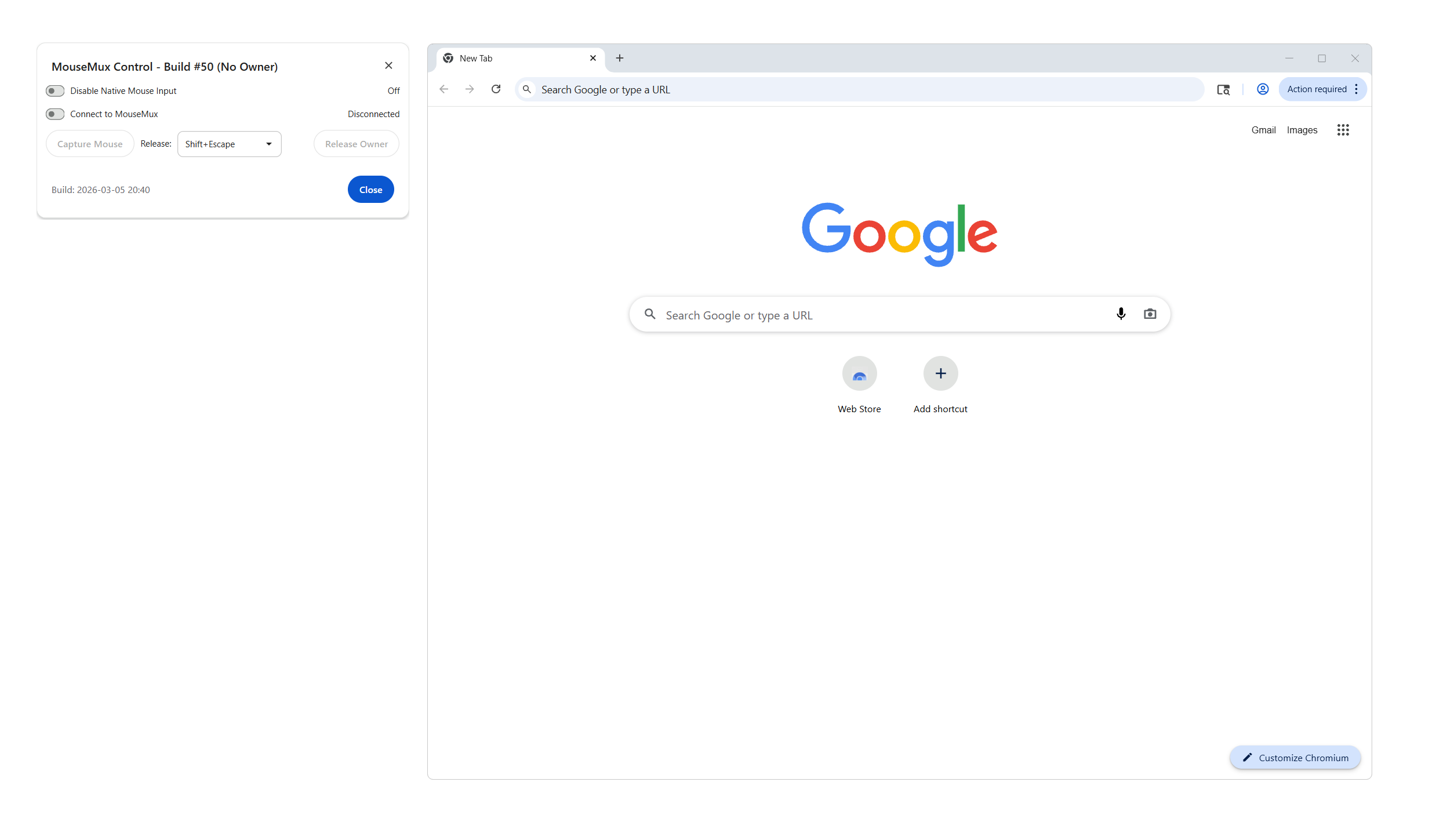
When you launch Chrome with MouseMux integration enabled, a small MouseMux Control Dialog appears alongside the browser. This dialog shows connection status and provides controls for multi-seat operation.
Any connected user can claim the browser window by clicking on it. Once claimed, that browser instance belongs to that user.
To enter full multi-seat mode, the owner clicks Capture Mouse. This tells MouseMux to route the owner’s physical mouse and keyboard exclusively to this Chrome window. All mouse input is directed at this window and all keyboard input is sent here, regardless of where the cursor is on screen. No other user can accidentally interact with your window. Each user captures their own Chrome window, and everyone works independently on the same machine — a true multi-seat setup.
Other users can launch additional Chrome instances and claim those for themselves. Each person ends up with their own browser, their own tabs, their own history for that session, and their own cursor controlling it all. The browsers run independently. One user’s actions don’t affect another user’s session.
This differs fundamentally from simply sharing a browser. In traditional shared browsing, everyone fights over the same cursor, the same tabs, the same session. With the MouseMux Compliant Edition, each person has genuine independence. It’s like having multiple computers, but on a single machine.
The control dialog provides the following controls:
MouseMux Connection (toggle) — Connects to the MouseMux server. Must be on for multi-seat features to work.
Native Input Blocking (toggle) — Prevents the operating system’s own mouse and keyboard events from reaching the browser. This is turned on automatically when you enter capture mode, ensuring only your dedicated input reaches the page without duplication.
Capture Mouse (button) — Enters capture mode. MouseMux routes your physical mouse and keyboard exclusively to this browser window. All your mouse input is directed at this window and all your keyboard input is sent here. No other user can interact with your window while captured. The button changes to “Release Capture” while active.
Release Owner (button) — Gives up your claim on this browser window, making it available for anyone to use.
Release Hotkey (dropdown) — Choose which keyboard shortcut exits capture mode (default: Shift+Escape). Use this when you need to release your mouse and keyboard from the window.
In normal mode (after claiming, before capturing), your mouse controls the browser but still moves freely across the screen. Other users could accidentally click on your window.
In capture mode, all your mouse and keyboard input is routed exclusively to this browser window. Other users cannot interfere with your session. This is the recommended way to use Chrome in a multi-seat environment.
To exit capture mode, press the release hotkey (default: Shift+Escape).
Shared Workstations. In offices or labs where multiple people share a single computer, each person can have their own browser session. No need to log out, close tabs, or worry about someone else seeing your browsing. Claim a browser, do your work, release it when done.
Computer Labs and Libraries. Educational institutions can set up workstations where multiple students work simultaneously. Each student claims their own Chrome instance for research, assignments, or general browsing. Instructors can browse alongside students, looking up reference materials or demonstrating techniques.
Collaborative Research. Research teams can work together on a shared workstation, each person browsing different sources, comparing information, and gathering materials. Everyone sees their own browser with their own cursor, but they’re all in the same physical space, able to discuss and share findings in real-time.
Family Computers. A shared family computer becomes more practical when each family member can have their own browser session running simultaneously. Parents and children can browse independently without interfering with each other’s sessions.
Kiosk and Display Systems. Multi-user kiosks can serve several people at once. Each user claims a browser instance and browses independently. When they walk away, the session can be released for the next user.
Training and Demonstrations. Trainers can browse reference materials while trainees follow along in their own browser instances. Everyone participates actively rather than passively watching a single shared screen.
Each Chrome instance runs as a separate process with its own profile space. MouseMux tracks which user has claimed each browser window and routes input accordingly. When User A moves their cursor over their claimed Chrome window and clicks, that click goes to their browser. User B’s cursor and input go to their own claimed browser, even if both browsers are visible on screen.
The claim system uses MouseMux’s window ownership model. A user can claim an unclaimed window by interacting with it (the specific mechanism depends on your MouseMux configuration, typically clicking or using a hotkey). Once claimed, the window responds only to that user’s input until released or until the user disconnects.
Browser sessions are isolated from each other. Each instance maintains its own: - Open tabs and browsing history - Cookies and site data (for the session) - Download queue - Extension state - Form data and autofill
This isolation means one user’s browsing doesn’t leak into another’s experience.
Running multiple browser instances requires more system resources than a single browser. Each Chrome instance consumes memory for its tabs, media, and rendering. Modern systems handle this well, but keep the following in mind:
For optimal performance, close unused tabs and browser instances when not needed.
Each browser session is independent, but be aware that:
For shared environments, consider enabling Chrome’s Guest mode or configuring session cleanup policies.
Chrome is a trademark of Google LLC. The MouseMux Compliant Edition is a derivative work created to enable multi-seat browser functionality. This distribution includes Chrome binaries along with MouseMux integration components.
| Version | 2.2.50 |
| Category | productivity |
| Publisher | |
| Platform | win32-create |
| Status | Available |
| Updated | 2026-11-03 |
We can do that! In days, not months. Affordable pricing.
As the creators of MouseMux, we have complete control over every aspect of the platform. We can customize MouseMux to your exact needs: add your branding, run it invisibly in the background, modify behavior, or build entirely new features. Whether you need a custom multi-cursor application from scratch, want to adapt existing software for multi-user collaboration, or require deep MouseMux integration into your workflow, our team delivers.
Trusted by industry leaders











