SCADA Simulator
Multi-operator nuclear reactor control room simulation
industry
SDK example
v2.2.29
Multi-operator nuclear reactor control room simulation
Multi-operator nuclear reactor control room simulation.

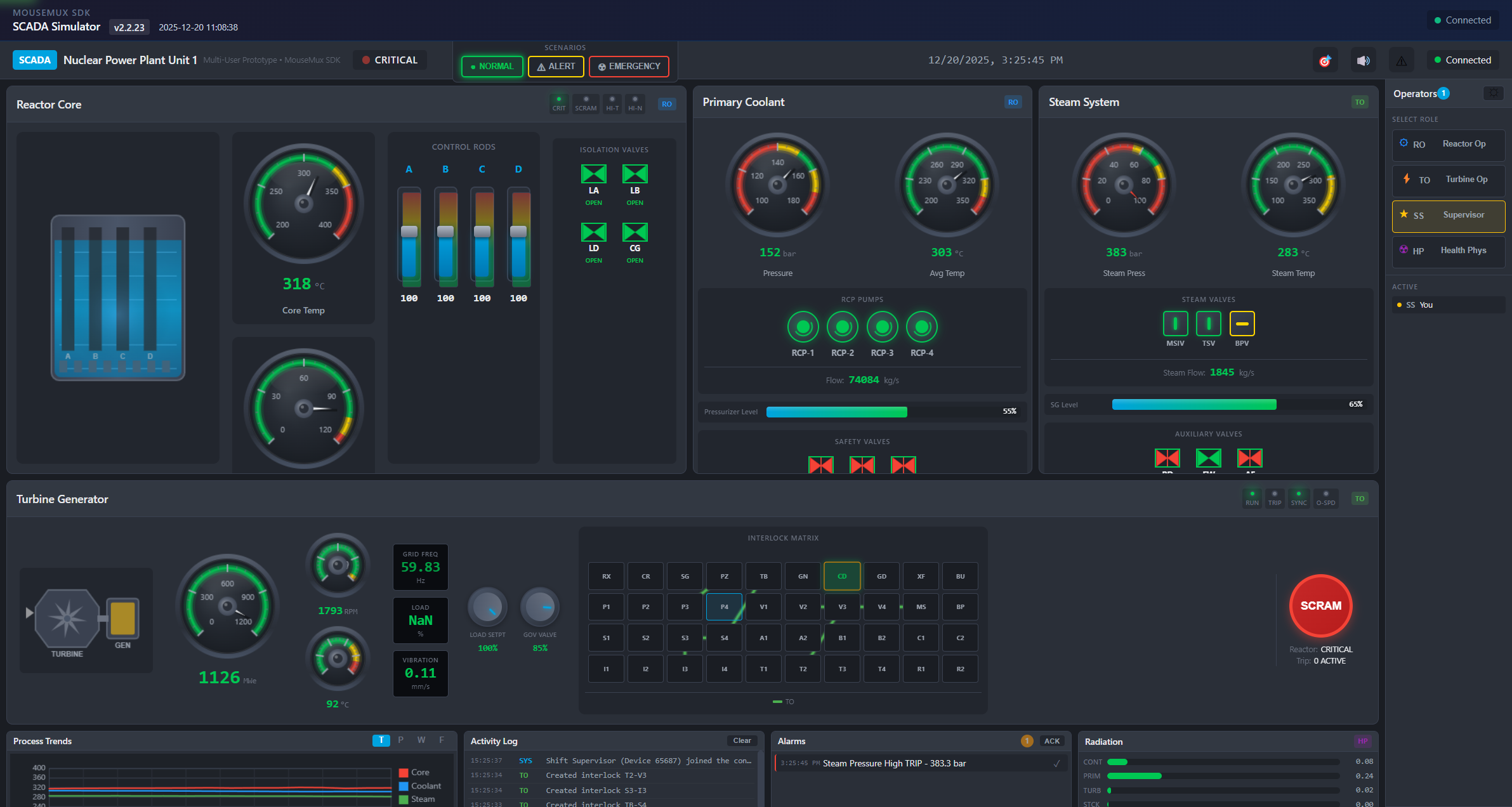
A simulated nuclear reactor control room where multiple operators can work together managing different parts of the plant. It’s designed to look like industrial control systems you’d see in real facilities, with animated gauges, alarm panels, and control buttons. Each operator picks a role - reactor operator, turbine operator, shift supervisor, or health physics - and gets access to the controls for their area. This is a training simulation, not connected to anything real.
When you launch the app, you pick your operator role. The reactor operator controls the reactor core and control rods. The turbine operator manages the steam systems and generator. The shift supervisor has full access to everything and can trigger the emergency SCRAM button. Health physics monitors radiation levels. Everyone sees the same plant state updating in real-time as operators make changes.
The interface shows animated gauges for things like pressure, temperature, and power levels. There are 11 valve systems you can open and close, trend charts showing how parameters change over time, and an alarm panel that lights up when something goes wrong. You can run training scenarios like coolant leaks or power losses to see how the plant responds and practice emergency procedures.
There’s also a node connection matrix where you can draw connections between different plant systems to visualize how things are linked together - useful for understanding the layout and dependencies. Sound effects play for alarms, pumps, and valves. Everything updates based on a physics simulation running in the background.
Launch the app from the MouseMux launcher and connect when prompted. Select your operator role - each role has different controls available. Use the quick scenario buttons at the top to trigger normal, alert, or emergency conditions, or just interact with the controls in your area. The gauges and displays will update to show what’s happening in the plant. You can switch between light and dark themes in the toolbar.
MouseMux Development Team · https://www.mousemux.com
| Version | 2.2.29 |
| Category | industry, SDK example |
| Publisher | MouseMux Development Team |
| Platform | Web App |
| Status | SDK App |
| Updated | 2025-12-21 |
We can do that! In days, not months. Affordable pricing.
As the creators of MouseMux, we have complete control over every aspect of the platform. We can customize MouseMux to your exact needs: add your branding, run it invisibly in the background, modify behavior, or build entirely new features. Whether you need a custom multi-cursor application from scratch, want to adapt existing software for multi-user collaboration, or require deep MouseMux integration into your workflow, our team delivers.
Trusted by industry leaders











